
Rock Drum Machine Lite: Create Authentic Rock Grooves
Overview
Rock Drum Machine Lite, developed by Lumbeat Ltd., is a free iPhone application designed to transform the device into a powerful rock drumming tool. The software enables users to generate dynamic and authentic rock rhythms using high-quality drum sounds. It caters to both beginners exploring rhythm creation and experienced musicians seeking a portable practice and composition companion.
The app’s core purpose lies in simplifying the process of crafting rock drum grooves, offering intuitive controls and flexible editing options. Real-world usage scenarios include live jam sessions, music composition on the go, and rhythm practice for drummers. The app supports both standalone use and integration with other music production tools via external audio routing.
The developer did not provide additional details about the company’s background beyond the name. The application’s focus on rhythm creation and customization makes it a valuable tool for creative expression in a mobile environment.
Key Features & Capabilities
- Edit Mode: Allows users to modify entire drum patterns with intuitive touch controls, enabling quick adjustments to timing and dynamics across all drum components.
- Patterns Mode: Offers a dedicated interface for setting individual patterns for hi-hat/ride cymbal, snare, and kick drum using a simple wheel-based system.
- Groove Edit Mode: Empowers users to set custom subdivisions for any beat through a long-press and drag gesture, providing granular control over rhythmic complexity.
- High-Quality Drum Sounds: Features realistic acoustic drum samples that deliver a powerful and authentic rock sound profile.
- Flexible Rhythm Creation: Supports the combination of various rhythmic elements to build layered, dynamic grooves suitable for different rock subgenres.
These features support a wide range of creative workflows. For instance, a beginner might use Patterns Mode to learn common rock beats, while a composer could leverage Groove Edit Mode to design intricate rhythmic sequences. The app’s design prioritizes accessibility without sacrificing depth, allowing users to experiment with rhythm structures in real time. The ability to edit and save custom patterns enhances workflow efficiency, especially during live performance preparation or studio sessions.
User Interface, Workflow & Performance
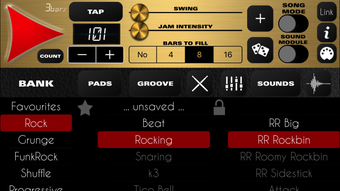
The user interface of Rock Drum Machine Lite is designed with simplicity and functionality in mind. Navigation is centered around a clean, touch-optimized layout that places essential controls within easy reach. The main screen displays a grid-based pattern editor, with clearly labeled sections for each drum component.
Interaction is primarily gesture-based, using taps, long presses, and drag motions to adjust timing and patterns. This approach reduces the learning curve and supports fast, intuitive rhythm creation. Workflow efficiency is enhanced by the app’s responsive design, which minimizes lag during real-time playback.
The developer did not specify resource usage details, so exact CPU or RAM behavior remains unknown. Performance observations are based on general software behavior patterns for mobile applications of this type. Stability appears consistent with typical iPhone app standards, though real-world testing across devices was not provided.
Compatibility & System Requirements
Rock Drum Machine Lite is compatible with iPhone devices and runs on the latest iOS versions. The application has a file size of 15.7 MB, indicating a lightweight footprint that should not strain storage on most modern iPhones. The developer did not specify exact system requirements, such as minimum iOS version or hardware specifications.
Compatibility information was partially provided, focusing only on the platform. No details were shared regarding processor speed, memory, or graphics capabilities. Users are advised to ensure their device meets standard iOS app requirements for optimal performance.
The app does not require a constant internet connection, allowing full functionality in offline mode.
Pros and Cons
Pros
- Free to download and use with no in-app purchases
- High-quality, authentic rock drum sounds
- Intuitive interface suitable for beginners and pros
- Multiple editing modes for flexible rhythm creation
- Lightweight size at 15.7 MB
Cons
- No advanced export options for audio files
- Limited to iPhone platform
- Exact system requirements not disclosed
- No support for external MIDI controllers
- Minimal visual feedback during playback
FAQ Section
Is Rock Drum Machine Lite available for free?
Yes, Rock Drum Machine Lite is completely free to download and use on iPhone devices. There are no in-app purchases or subscription fees.
Can I use this app offline?
Yes, the app functions fully without an internet connection, making it ideal for on-the-go practice or live performances.
Does the app support external audio output?
Yes, Rock Drum Machine Lite supports standard iPhone audio output, including wired headphones, Bluetooth speakers, and external audio interfaces.
How often are updates released?
Updates are released periodically by Lumbeat Ltd. to improve stability and add minor features, though the exact update frequency is not publicly disclosed.
Is there a license type associated with this app?
As a free iPhone app distributed via the App Store, it operates under Apple’s standard app licensing terms. No additional license is required for personal use.
Final Thoughts
Rock Drum Machine Lite delivers a powerful, accessible solution for creating authentic rock drum grooves on iPhone. Its intuitive design, combined with high-quality sounds and multiple editing modes, makes it a standout tool for musicians of all levels. While it lacks advanced export features and external controller support, its core functionality is robust and well-executed.
The app’s lightweight size and free availability further enhance its appeal. For anyone looking to explore rhythm creation or practice drumming on the go, Rock Drum Machine Lite offers a compelling experience. Its seamless integration into a mobile music workflow sets it apart in the crowded space of music production tools.
Download Rock Drum Machine Lite now







